This is the Shargeek 300 – one of the most powerful portable power banks currently available, with 300 W of output across four ports, 140 W fast charging, RGB lighting and a multi-colour display packed with information. But is it any good, and does it live up to all its marketing claims?
After putting it through a range of tests – including verifying the claimed 300 W output and measuring its real capacity – there are some things it does extremely well, and a few quirks you should know about. So let’s take a closer look.

Overview
In the box you get the power bank, a 240 W USB-C cable, a soft storage case and a user manual.

The Shargeek 300 is well built with the trademark transparent design but only around the front and back – the main body is aluminium. Through the transparent back you can see four of the six grey Ampace 21700 4 Ah cells.

It is the heaviest power bank I’ve come across, weighing in at a substantial 750 g. That’s heavier than my go to comparable Anker 250 W power bank at 679 g and noticeably heavier than the 300’s predecessor the Shargeek 100, previously called the Storm 2, at 598 g.
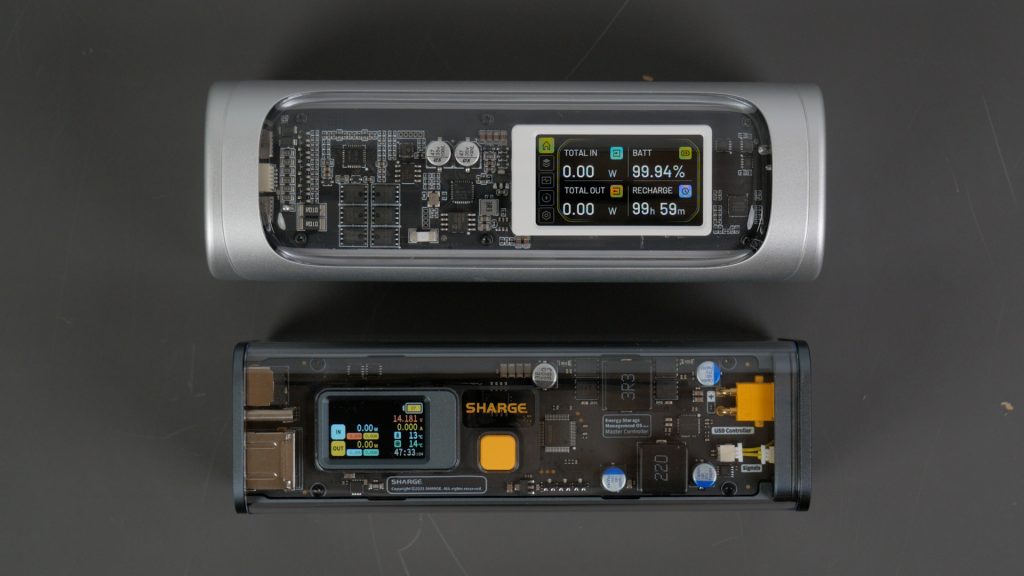
You can turn the power bank on with a long press of the power button but it also comes on when you plug anything in.

The screen is a huge upgrade over the old version – although not as big and bright as on the Shargeek 170.

The Shargeek 300 has similar outputs to its predecessor but with a significant spec bump for every port. And there’s more space between the ports which makes plugging in multiple larger connectors possible.

There are now two 140 W two-way USB-C ports, a flexible 140 W two-way DC 5525 port and a 20 W USB-A output. All the two-way ports can be used for both input – to charge the power bank, and output.
Performance

The unit charges at up to 140 W – but you’ll need both a capable charger and cable. You can use the 240 W braided cable supplied, or any USB Power Delivery 3.1 or EPR rated cable.
Here I’m charging the unit using the 140 W output on Bluetti’s Elite 30 I just reviewed but I also tried the Shargeek S140 and my 140 W Macbook charger.

The power bank charged from completely flat in an hour. It briefly hit the full 140 W, but quickly dropped back to around 100 W for most of the charge which is slightly disappointing

You can charge pretty much any device that charges via USB with this power bank, including laptops, drones, torches and even other power banks.
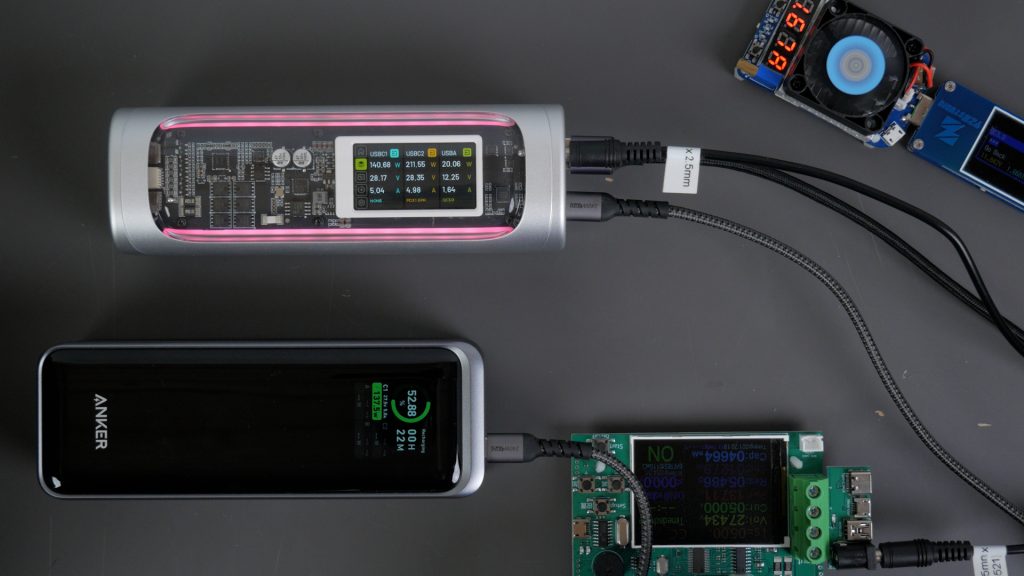
I tested all the ports at their full output to see if the Shargeek could actually achieve its claimed 300 W total output. I charged an Anker power bank at its full 140 W from the USB-C1 port, and I attached a 140 W load off the 140 W DC output and a 20 W load off the USB-A port.
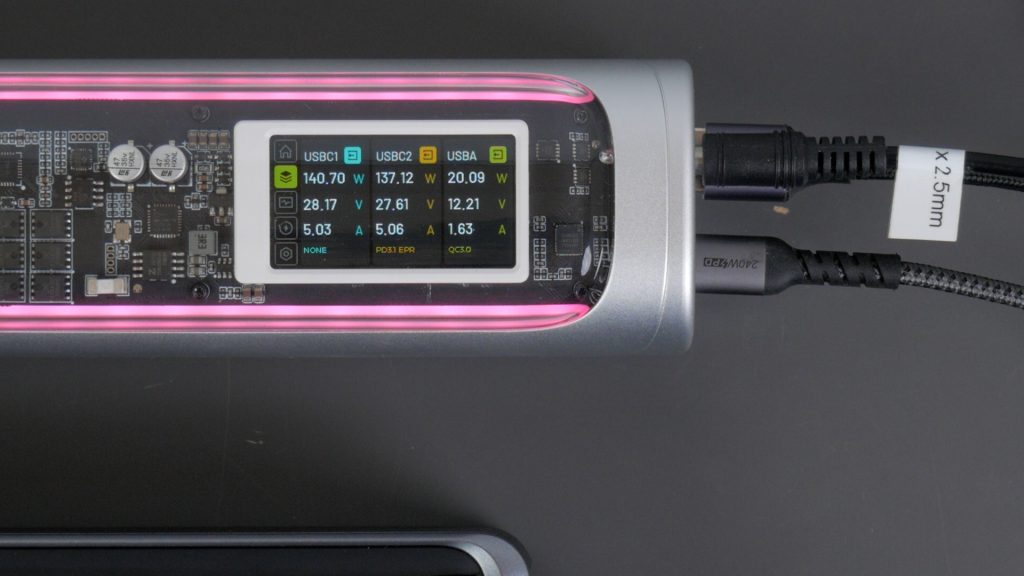
I did manage to get the full 300 W output which is impressive. The only slight anomaly was the total output display on the main screen didn’t report this total power – I had to use the charging spec screen. This is a review sample – I’m assured by Sharge that the final unit will display total output correctly.

I checked the temperature of the power bank with my thermal imaging camera at this full output – it stayed remarkably cool, probably helped by the aluminium enclosure.

It also supports passthrough charging – so you can charge via either of the USB-C ports and still use the other two USB ports. Passthrough charging doesn’t work if you charge the unit via the DC jack.

The power bank also works well with lower powered devices like my AirPods Pro – without timing out and even gives a pretty accurate output measurement in line with my USB power monitor to one decimal place typically.

Next I measured the true capacity of the power bank. The power bank is rated at 24000 mAh which corresponds to 86.4 Wh at a nominal battery voltage of 3.6 V. That makes it airline safe – but actually less capacity than the original Shargeek 100 at 93.5 Wh and the Anker for that matter at 99.54 Wh.

With the power bank fully charged I ran a load at around 85 W until the battery was completely depleted which took 55 minutes. I measured 75.6 Wh which gives around 88% efficiency which is a good result. And that’s enough usable capacity to charge a typical smartphone about four to five times, or give a modern laptop like this 14” MacBook Pro roughly a full charge.

Next I checked the power bank’s protocol support, so you can make sure it’ll charge your device. Sharge has most major protocols covered, including USB Power Delivery 3.1 at 28 V and 5 A which gives the 140 W output.

Even the legacy USB-A port supports most fast-charging standards up to and including 20 W – 12 V at 1.67 A as you saw in the earlier 300 W output test.

Sharge do list 20 V at 1 A but I couldn’t replicate that during testing.

I’m not sure many people will make use of the DC barrel jack output, but I’m pleased they included it again – like on the original.

It’s aimed more at technical users, but it can be genuinely useful. You can set the output voltage of this port from 3.3 V all the way up to 28 V – at up to a decent 5 A. It would be nice if Sharge supplied at least a DC 5525 to DC 5525 cable with the power bank.

Impressively I could run my diesel heater, that I reviewed recently, off this DC 5525 port. As a test, I soldered the heater’s supplied DC cable to a barrel jack and set the output voltage to 24 V. Note that when you enable the DC output, the USB-C1 port is disabled.

These diesel heaters can pull a fair bit of current when they start heating up their glow plug. This can be too much for the typical 12 V car outlet on many much larger portable power stations, but the Shargeek ran it fine. The diesel heater pulled up to 140 W from the power bank.

And once it’s heated up, you could run the diesel heater for over 8 hours at the lower output levels.

More typically you might use the DC output for various lighting solutions or as a handy bench power supply for small electronic projects.
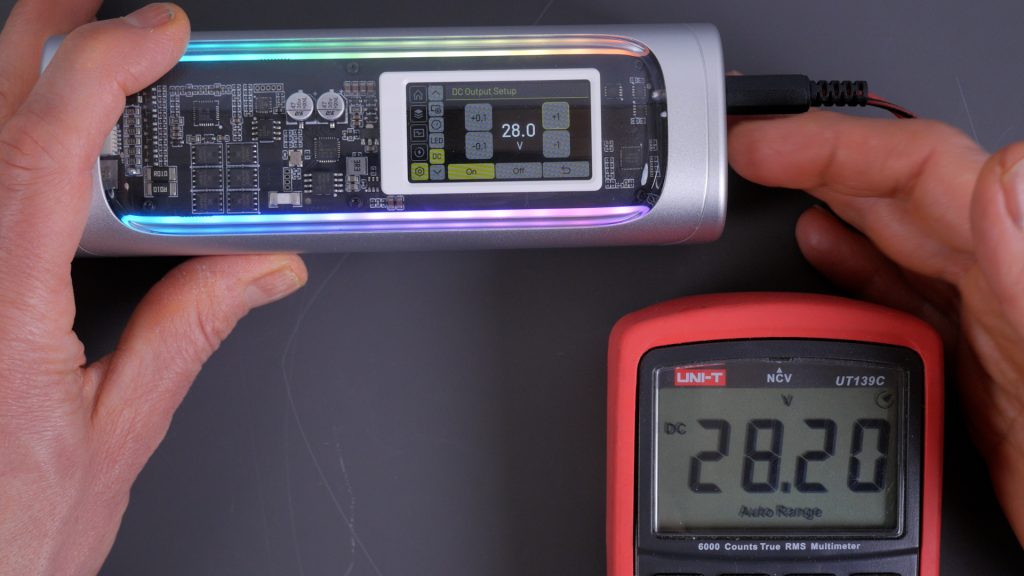
It’s not especially accurate, so you’ll want to check the output with a multimeter. But you can set the voltage in 0.1V increments to get exactly what you require.

There are plenty of display screens and settings, but the controls to move around are cumbersome – and the outline highlighting the setting you want to change is very faint. From the main display you can use the up and down buttons to cycle through the Charging Specs screen, the Power Curve screen which shows Power over time, and the Battery Monitor screen which shows the voltage of each individual battery, the internal temperature, the cycle count and the total input and output in Wh.

Then you enter settings pressing the power button, where you can cycle through the charging history, change the language, configure the display, set the battery mode, configure the RGB lighting and then finally back to the DC output screen again.

It’s a shame there’s no accompanying app like on the Anker power bank. It would make configuring the power supply mode and the lighting a lot easier. It might also allow for firmware updates – to fix issues like the total output display for example.
Conclusions

Overall the Shargeek 300 is an impressive power bank – with better outputs than many larger portable power stations I’ve tested. Very few power banks can deliver two 140 W USB-C outputs simultaneously.
It is heavy though, and although this is meant to be the final release version there are still a few anomalies. Not just the total output display – sometimes the language temporarily reverts to Chinese for instance.
When I receive the final unit I’ll update this article to confirm Sharge have fixed these minor issues.
Also this will come down to personal preference and it is nitpicking but I’m not a huge fan of the design of this power bank. I would have preferred fewer curves, both aesthetically but also practically – it’s not very stable laid on its back and it rocks around. The back plastic also scratches easily. It would make sense to have the back aluminium and the sides transparent. I also hope they can release a darker version – personally I’d prefer that to the white and silver.
Don’t forget to take a look at my YouTube video at the top of the page, and again please subscribe to my YouTube channel where I’m releasing videos every week on the latest technology and how to get the most out of it. If you tap the bell icon when you subscribe you’ll get a notification as soon as I release a video, and there’ll be a link to my site here for the written article. YouTube is also the best place to leave a comment. I read all of them and respond to as many as I can!
Further details:
Kickstarter campaign: https://sharge-1.kckb.me/6bba5f00
This product is currently on Kickstarter, so the usual caveats about crowdfunding projects apply. I’ll add Amazon links once it becomes widely available.
Leave a Reply